Deleting a Project
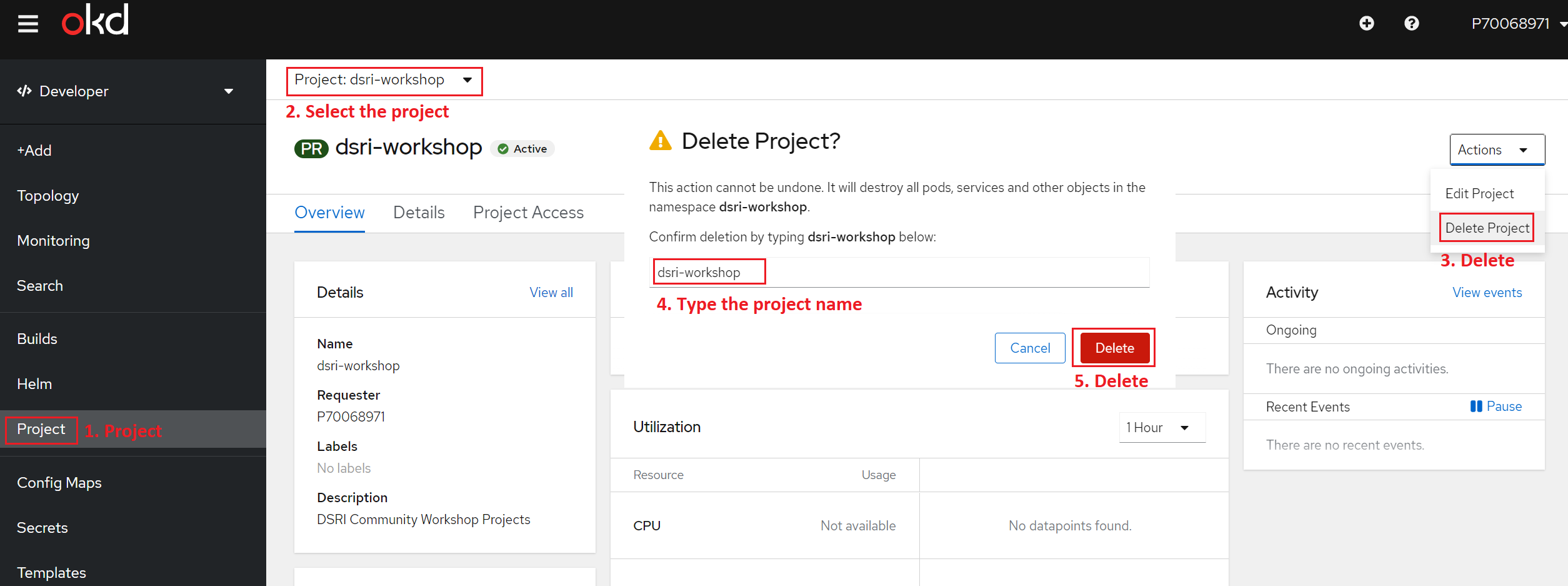
Delete a project using the web UI
Navigate to Home → Projects.
Locate the project that you want to delete from the list of projects.
On the far right side of the project listing, select Delete Project from the Options menu
 .
.When the Delete Project pane opens, enter the name of the project that you want to delete in the field.
Click Delete.
Delete a project using the CLI
Delete Project
When you delete a project, the server updates the project status to Terminating from Active. Then, the server clears all content from a project that is in the Terminating state before finally removing the project. While a project is in Terminating status, you cannot add new content to the project. Projects can be deleted from the CLI or the web console.
You need to be logged in to the DSRI and copy the login command.
Run
oc delete project <project_name>Example
oc delete project dsri-workshop